

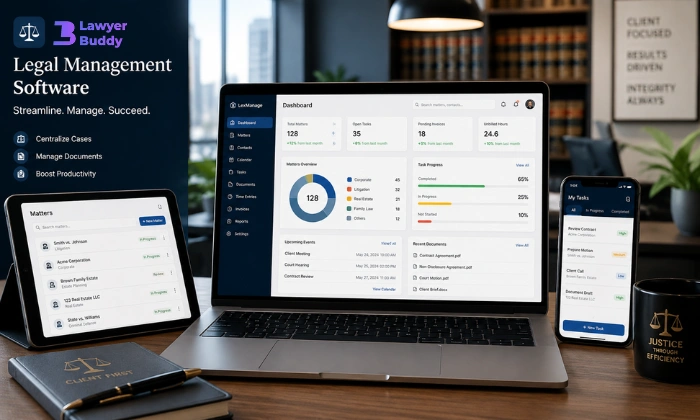
Legal management software promises better organization, faster workflows, and fewer operational headaches. Yet many law firms still struggle during implementation because the transition affects much more than technology. It changes how attorneys collaborate, how documents move through the firm, and how daily legal work gets managed.
Some firms discover hidden inefficiencies during rollout. Others realize their workflows were never clearly defined in the first place. That is why successful implementation requires a strategy before software setup even begins.
The firms that get this right usually focus on operations first and technology second.
Read Aloud!
Why Law Firms Are Reworking Their Operations

Law firms are under pressure from multiple directions. Clients expect faster responses. Remote collaboration has become normal. Administrative work continues to grow, especially around compliance and documentation.
At the same time, many firms still rely on disconnected systems for billing, communication, scheduling, and document storage. This is exactly where legal management software becomes essential for unifying daily operations. Those gaps create delays that quietly reduce productivity every day.
A missed follow-up email may seem minor. So does searching for the latest contract version. But repeated hundreds of times each month, those small inefficiencies become expensive.
Legal management software helps centralize these processes into one structured workflow. Instead of switching between spreadsheets, inboxes, shared drives, and calendars, teams work inside a connected system.
That operational clarity is often the biggest improvement firms notice after implementation.
What Makes Legal Software Implementation Successful?
Most firms assume implementation is a linear process, but it usually works more like refining how work already flows.
It starts with understanding current workflows, not software features. Once that’s clear, goals like faster case handling or better billing accuracy become easier to define.
Software selection works best when it reflects the real operational structure. A mismatch between firm size, practice style, and system design usually shows up quickly.
Data cleanup matters more than most teams expect. Old files, inconsistent naming, and scattered records can slow everything down if not addressed early.
Training is more effective when tailored by role instead of delivered as a single session. Attorneys and support staff use the system differently, so their learning paths should differ too.
After launch, adoption takes time. Monitoring usage and adjusting workflows is what turns implementation into lasting improvement, not just installation.
Before Choosing Software, Fix the Workflow Problems First
One mistake appears in almost every failed legal management software rollout. Firms buy software before understanding how work actually moves through the organization.
Technology does not automatically improve inefficient processes.
For example, if attorneys follow different naming conventions for documents, new software will not solve the confusion on its own. The same issue appears with inconsistent billing habits or scattered communication practices.
Good implementation starts with operational clarity.
Technology Cannot Repair Chaotic Processes.
Many law firms expect new software to fix operational problems automatically. It rarely works that way.
If a firm already struggles with missed deadlines, scattered documents, or unclear responsibilities, those same issues usually continue after implementation. The only difference is that they now exist inside a digital system.
Take document management as an example. One attorney saves files by client name, another by matter number, and someone else keeps documents in email folders. A new platform cannot create consistency unless the firm agrees on a standard process first.
The same problem shows up in billing and communication. When updates happen through hallway conversations or untracked email chains, information eventually gets lost. Software can support accountability, but it cannot replace it.
Before migrating to legal management software, firms should simplify a few core workflows:
- how documents are named and stored
- Who owns specific tasks
- How approvals are handled
- where client communication is logged
- How deadlines are monitored
- When billing entries are recorded
These details may seem small at first. Together, they shape how smoothly the entire system operates later.
Map How Work Actually Moves Through the Firm
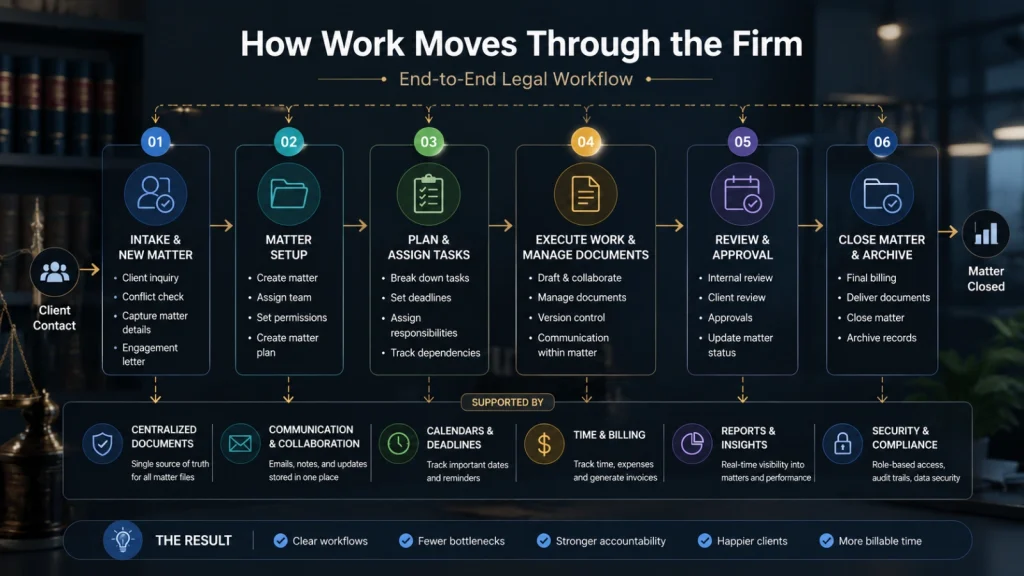
Every legal team has its own rhythm. A litigation practice handles workflows differently than an estate planning firm or an in-house legal department.
That is why implementation should start with observation, not assumptions.
Follow a case from the first client call to final resolution. Look closely at where work slows down, where information gets repeated, and where staff rely on manual workarounds.
In many firms, the biggest inefficiencies hide inside routine tasks.
A paralegal may re-enter the same client details into multiple systems. Attorneys might spend fifteen minutes searching for the latest contract draft because documents are stored across shared drives and inboxes.
These problems rarely appear during software demos. They become visible only when firms examine daily operations honestly.
Mapping the workflow before choosing legal case management software helps firms avoid forcing technology onto broken processes. Instead, the software supports a cleaner and more efficient way of working from the beginning.
How to Choose Legal Management Software That Fits Your Firm
The best platform is not necessarily the one with the most features. Practical usability matters more than long feature lists.
A system that slows attorneys down will face resistance quickly, even if it looks impressive during demonstrations.
Features That Matter in Daily Legal Work
Certain tools consistently improve operations across firms. The right legal management software brings these features together into a single system:
- centralized document management
- calendar and deadline tracking
- billing and time capture
- workflow automation
- secure client communication
- task management
- integration with accounting and email systems
Legal document management software becomes especially valuable when firms handle large case volumes or extensive compliance records.
Fast document retrieval saves more time than many firms expect. Attorneys should not waste billable hours searching through folders or outdated email attachments.
Cloud-Based vs On-Premise Systems
Cloud-based systems continue to grow because they support remote access and reduce internal maintenance responsibilities.
For hybrid legal teams, accessibility matters. Attorneys often need secure file access from courtrooms, home offices, or client meetings.
On-premise systems still appeal to firms with stricter infrastructure preferences. However, they usually require more internal IT support and ongoing maintenance.
Security concerns influence both decisions. Reliable providers now offer encryption, role-based permissions, audit tracking, and compliance protections built specifically for legal operations.
Questions to Ask Before Signing a Contract
Many firms focus heavily on software features while overlooking implementation support.
Before choosing any case management software, legal teams should ask:
- How does onboarding work?
- Is migration assistance included?
- What training resources are available?
- Can workflows be customized?
- What security standards are supported?
- Are there hidden setup costs?
The answers usually reveal how smooth the implementation will actually feel in practice.
The 5-Phase Legal Management Software Implementation Framework
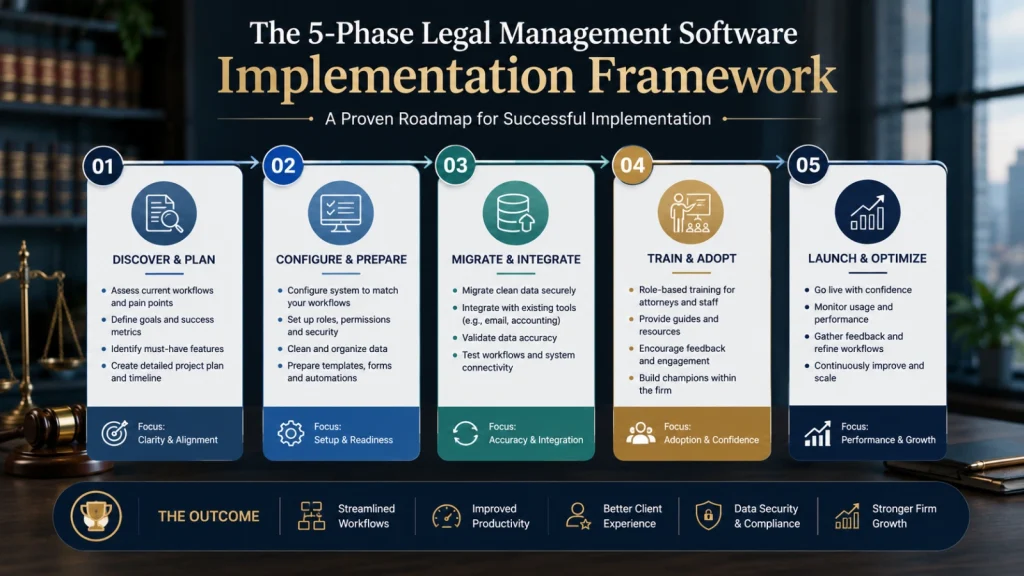
Implementation works better when introduced gradually. This is especially true for legal management software used across multiple teams. Large operational changes often create frustration when teams feel overwhelmed.
A phased rollout reduces resistance and helps firms adapt more naturally.
Phase 1: Define Clear Goals
Start with measurable outcomes.
Some firms want faster billing cycles. Others focus on improving response times or reducing administrative workload. Clear goals guide implementation decisions later.
Without defined success metrics, it becomes difficult to measure progress.
Useful goals may include:
- reducing missed deadlines
- shortening intake processing
- improving billing accuracy
- increasing document retrieval speed
Specific targets create accountability across the implementation process.
Phase 2: Organize and Clean Existing Data
Data migration creates problems when firms move outdated records into new systems without review.
Duplicate files, inconsistent naming structures, and incorrect permissions create confusion quickly.
Cleaning data before migration takes extra effort, but it prevents long-term operational frustration.
This stage often gets rushed. That usually becomes a mistake later.
Phase 3: Roll Out the Software in Stages
Many firms attempt a full rollout immediately. The result is often disruption across multiple departments at once.
A staged implementation works far better.
Start with one team or practice group. Test workflows, gather feedback, and identify friction points before expanding the rollout across the firm.
This approach improves confidence while minimizing operational risk.
Phase 4: Train Teams by Role
Attorneys, paralegals, assistants, and operations managers use legal management software differently.
Training should reflect those differences.
Generic onboarding sessions rarely address practical day-to-day responsibilities. Staff adoption improves when training feels directly connected to real tasks.
Resistance usually comes from uncertainty rather than unwillingness.
When employees understand how the platform reduces repetitive work, adoption becomes much easier.
Phase 5: Monitor Adoption and Improve Workflows
Implementation does not end after launch.
Firms should monitor:
- usage patterns
- workflow delays
- staff feedback
- unresolved bottlenecks
- task completion rates
Small workflow adjustments often produce significant efficiency gains over time.
The firms that succeed treat implementation as an ongoing operational process instead of a one-time software installation.
Where Legal Management Software Delivers Immediate Results
Some operational improvements appear quickly after adoption.
Client intake becomes faster because forms, assignments, and follow-ups move through automated workflows instead of manual coordination.
Deadline management improves as automated reminders reduce the risk of missed filings or court dates.
Collaboration also becomes more efficient. Legal document management software allows teams to access updated files without searching through email threads or duplicate folders.
Billing accuracy often improves as well. Automated time tracking helps firms capture work that previously went unrecorded.
Remote legal teams benefit significantly from centralized access. Attorneys and staff can collaborate securely without relying on disconnected communication tools.
Read More!
What Does an Intellectual Property Lawyer Do? (And Do You Actually Need One?)
AI Tools for Lawyers: Everything You Need to Know (Top Tools)
Common Mistakes That Cause Implementation Failure
Some mistakes repeatedly appear during legal software rollouts.
Choosing legal management software based only on features is one of the most common mistakes. A platform may look powerful during demonstrations but feel impractical during daily operations.
Another issue is migrating poor-quality data into the new system. Confusing records create immediate frustration for staff.
Firms also underestimate resistance to operational change. Attorneys often rely on deeply established habits, especially under heavy workloads.
Trying to automate broken workflows creates another common problem. Software cannot solve unclear processes automatically.
Some firms also expect immediate productivity gains. In reality, there is usually an adjustment period before efficiency improves noticeably.
How LawyerBuddy Supports Modern Legal Workflows

LawyerBuddy helps legal teams simplify operational management without adding unnecessary complexity. It functions as a structured legal management software solution built for day-to-day legal workflows.
Instead of relying on disconnected systems, firms can manage key workflows from one centralized platform.
Key capabilities include:
- centralized case management
- organized document storage
- workflow automation for repetitive tasks
- secure team collaboration
- task and deadline tracking
- simplified communication workflows
- Operational visibility for growing firms
For firms managing increasing caseloads, centralized visibility becomes especially valuable. Teams work more efficiently when information flows through one organized system instead of scattered tools.
Why Team Adoption Matters More Than Features
Many implementation projects focus heavily on software capability while ignoring behavioral adoption.
That creates problems later.
Attorneys often develop highly personalized workflows over years of practice. Sudden operational changes can feel disruptive, especially when billable productivity is involved.
Leadership involvement matters here.
When firm leaders actively use the system and support adoption, teams are more likely to follow consistently. Small operational wins also build confidence early in the transition process.
The most successful legal management software implementations usually succeed because people adopt the workflows, not because the platform has the longest feature list.
Frequently Asked Questions
What is legal management software used for?
It centralizes case management, documents, billing, deadlines, and communication in one system.
How do you implement legal management software successfully?
Start with workflow review, clean your data, set goals, train teams by role, and roll out in phases.
What is the best legal case management software?
The best option depends on firm size, workflow needs, and required features like billing, automation, and document management.
How long does legal management software implementation usually take?
Most firms take a few weeks to a few months, depending on data size and workflow complexity.
Is legal document management software secure?
Yes, most modern systems use encryption, access controls, and compliance-grade security features.